
Learners
Interpret the brief, make creative decisions, explain their work and respond to critique.
ImaginePlus Explained
ImaginePlus is an AI creative media production environment for higher education. A learner might begin with writing, a performance idea, a visual reference, an original sound or a question. The educational purpose is to carry that beginning through experimentation, selection, production and reflection, while retaining a meaningful account of the learner’s choices.
“Work is love made visible.”
The application and its educational purpose
ImaginePlus brings creative production into an educational setting where a brief, an artistic intention and the choices made along the way belong to the same conversation. Learners develop video and graphics from their ideas, while educators consider the direction, the revisions and the explanation behind the work. Institutions agree the capabilities, access and responsibilities for their own delivery.
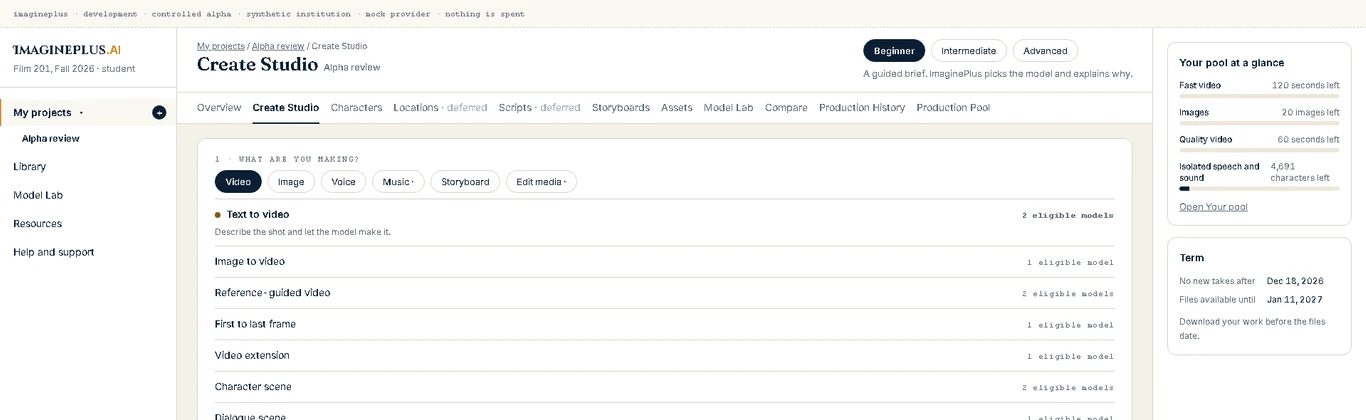
This company-owned interface capture shows a development build with demonstration data. The available capabilities and current screens for an institution are confirmed in its demonstration and delivery arrangements.
The creative learning workflow
The learner directs the work. These five moves connect an inner possibility with production, critique and revision. They can recur throughout a project; a new observation or a response to feedback can reopen an earlier decision.
Interpret the brief and form a possibility. Consider the story, the audience, the source material and the experience the work could offer.
Give the possibility a purpose. Define the visual language, performance, sound, references and constraints that will guide production.
Work with the enabled production tools. Develop alternatives and keep the creative brief present as choices become images, sequences and other production material.
Examine the alternatives with faculty or peers. Explain a selection, consider the effect of a decision and use feedback to understand what the work communicates.
Revise with a reason. Strengthen the work against the brief and bring the finished expression together with an account of how it developed.
Break an intention into scenes, shots and the material needed to make them.
Describe the people, places, objects and other references that give the work continuity.
Express the action, camera direction, dialogue, timing and visual intention of a shot.
Consider the institution’s available production capacity and the estimate for the proposed creation.
Use the production capabilities enabled for the project and its participants.
Compare, select and revise the work with attention to the changes and the sources used.
Review the finished direction, permissions, credits and the requirements of the assignment.
Bring selected material into the final production and confirm the export path available for the cohort.
References and continuity
A character, an environment, an object, a visual reference or an original sound can carry an intention from one production decision to the next. A useful reference has a purpose: it gives the learner something to retain, transform or deliberately reconsider. Its source and permissions belong beside that purpose.
Alternatives and revision
A first attempt, a selected direction and a finished piece represent different stages of judgment. Compare what each alternative communicates, explain why one serves the brief and consider what a revision changes. Review the available version and history controls in the workflow your institution will use.
Work and process evidence
Faculty can examine more than the appearance of a finished output. The brief, sources, choices, feedback and reflection give a production an educational context. The record available in a particular workflow depends on its enabled tools and the information supplied by participants; a demonstration identifies what is captured and how educators can review it.
Institutional access and production capacity
The institutional arrangement establishes who participates, the capabilities available to them, the cohort dates and the production allowances. Review how an estimate is shown, how usage affects the remaining allowance and who manages an extension or a request for support. Demonstration figures describe an example; the purchased arrangement establishes the actual allowance.
Review pricing and inclusions →Production levels and certificate programs
Beginner, Intermediate and Advanced describe how production decisions can be scaffolded for different preparation and assignments. The two ImaginePlus certificate programs establish their own preparation, eight-module structure and assessment requirements. Faculty consider both the learner’s readiness and the nature of the work.
| Production level | The assignment | The explanation |
|---|---|---|
| Beginner | A clear goal and a manageable set of production decisions. | Explain the chosen direction and connect it to the brief. |
| Intermediate | A sequence of decisions with constraints, critique and revision. | Explain what changed and why the revision better serves the work. |
| Advanced | A sustained production involving sources, trade-offs and coordinated choices. | Explain the artistic judgment connecting the process and the finished result. |
Three connected responsibilities
Interpret the brief, make creative decisions, explain their work and respond to critique.
Set the educational purpose, guide production and assess the evidence against the approved requirements.
Arrange enrollment, access, teaching responsibilities and the conditions under which the cohort works.
Bring a real production assignment, the people who will teach it and the requirements that shape its delivery. The demonstration is the place to review the available tools, recorded evidence, access arrangements and support together.

02 / Plan the educational experience
The curriculum establishes the work learners must demonstrate. Institutional teams should review the actual available screens, production controls, evidence process, privacy arrangements and support before agreeing the cohort.
Faculty & Assessment →How an institutional cohort works →For educators, faculty and institutional teams
Explore the production workflow, discuss your learners' preparation, and review the evidence and responsibilities for an institution-supported cohort.
Schedule a Demo